Your guide to PhilHealth.
Registration, membership records, contributions and benefits—find clear steps for the PhilHealth services you need.
PhilHealth services
at a glance.
PhilHealth provides health insurance benefits and membership services in the Philippines. This guide explains the main services you may need, from registration to using your benefits.
-
Membership registration
Register with PhilHealth and get your membership number. Learn the requirements and the registration process that applies to your situation.
-
Member records
View or print your Member Data Record, review your registered information and learn how to update details when something changes.
-
Contributions and payments
Check your posted contributions and understand the payment process for your membership category, including the Statement of Premium Account.
-
Healthcare benefits
Understand covered services, the documents you may need and how to find accredited facilities for the benefit you want to use.
PIN — PhilHealth Identification Number
MDR — Member Data Record
Log in to the PhilHealth Member Portal
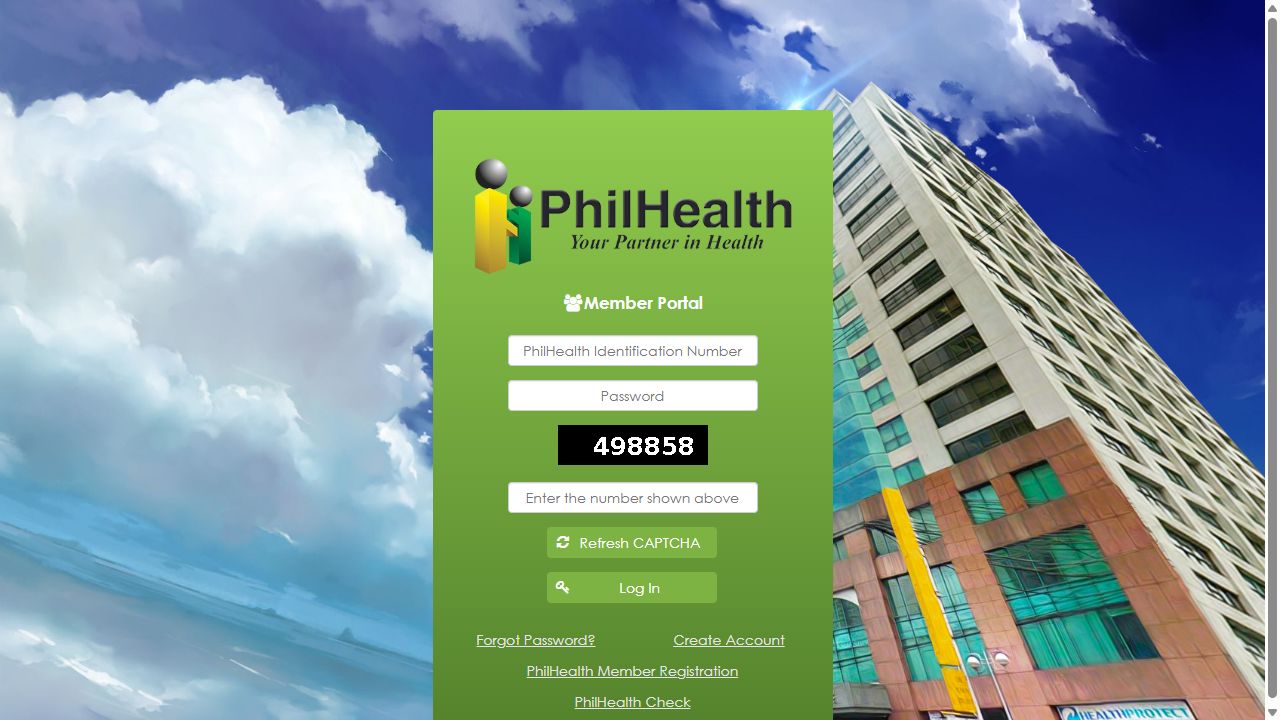
Open the official Member Portal using the button below. Then follow these four steps to sign in to your existing account.
-
Enter your PhilHealth number
Type your PhilHealth Identification Number (PIN) in the first field. Use the number on your PhilHealth ID or Member Data Record.
-
Enter your account password
Use the password you set when you created your Member Portal account. Check that Caps Lock is off.
-
Complete the CAPTCHA
Type the security code displayed on your own screen, not the code in this screenshot. Select Refresh CAPTCHA if it is difficult to read.
-
Select Log In
Check your entries, then select Log In. If your details are accepted, your member account will open.
Use this option if you already have a PhilHealth PIN but have not set up online access.
Use the official Forgot Password option when you already have an account but cannot remember your password.
Register with PhilHealth and get your PIN
This process is for individuals who have not been issued a PhilHealth number.
-
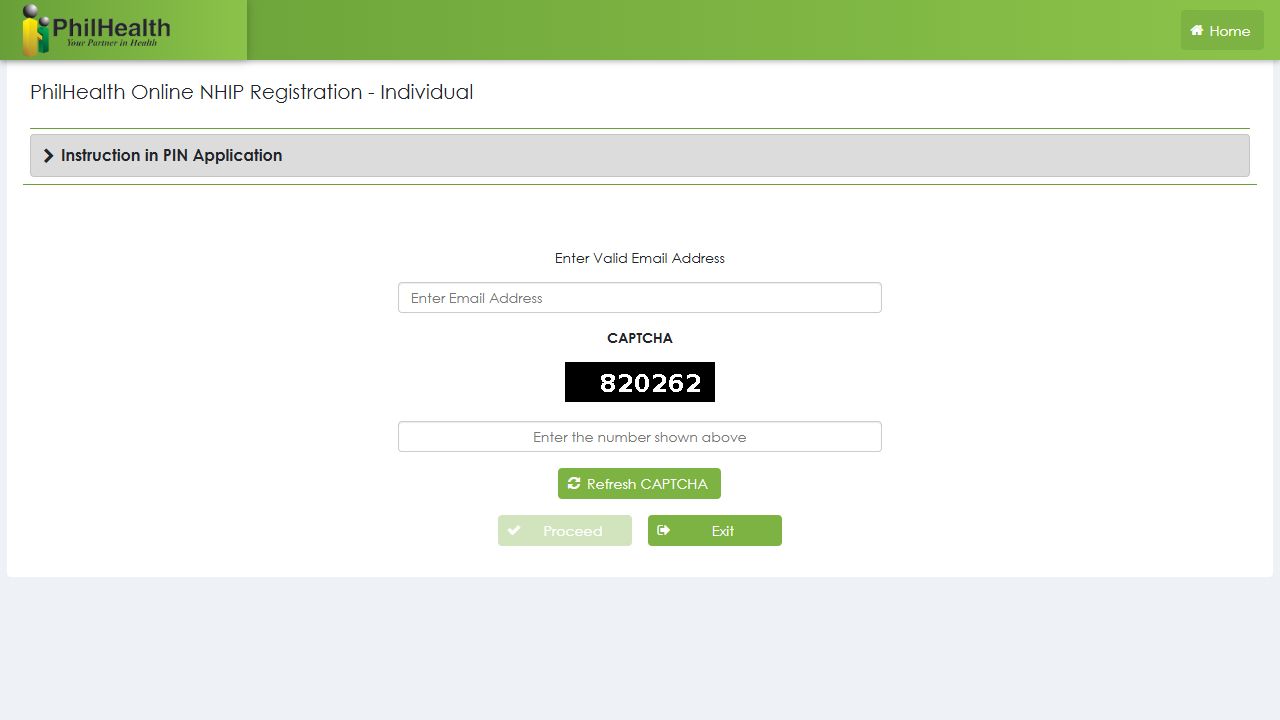
Read the application instructions
Open the official registration page. Read the PIN application instructions before entering your email.
-
Enter your email and CAPTCHA
Use an email you can access. Enter the code on your own screen, then select Proceed.
-
Complete the application
Follow the official form and upload your completed PhilHealth Member Registration Form (PMRF) and supporting documents. Check your details before submitting.
-
Check your email for the result
PhilHealth states 3–5 working days for complete applications. Your PIN is emailed after successful processing.
Create your Member Portal account
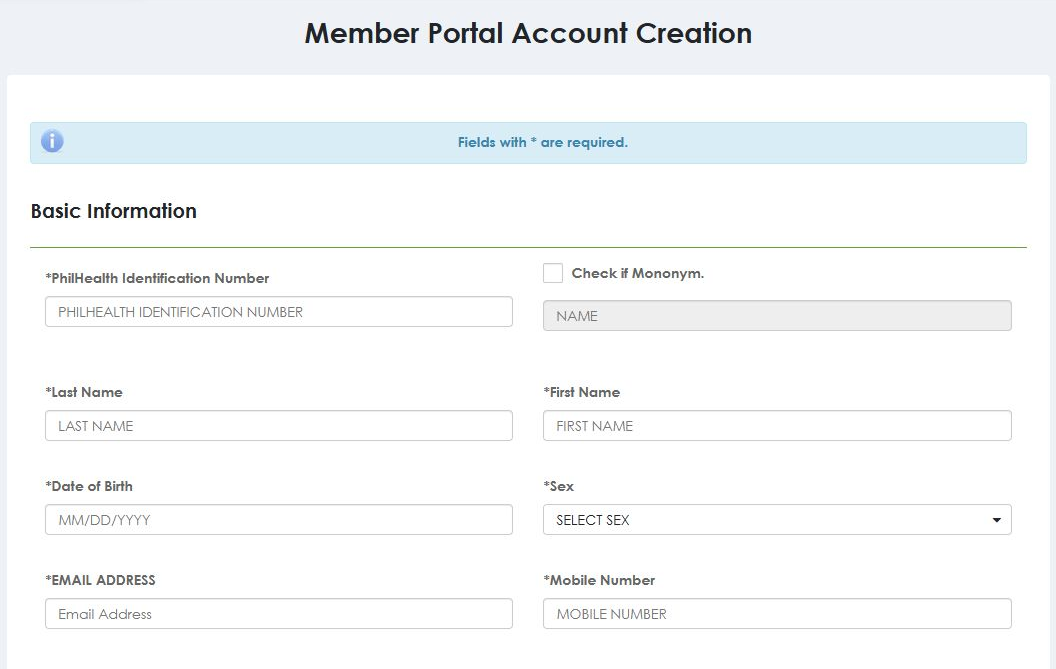
Use your existing PhilHealth PIN to set up online access. New members should complete membership registration first.
Open account creationAdd your membership details
Enter your PIN, name, birth date and other required details as recorded with PhilHealth. Add your email and mobile number. The Mononym option is for a person with one legal name.
Create a password and submit
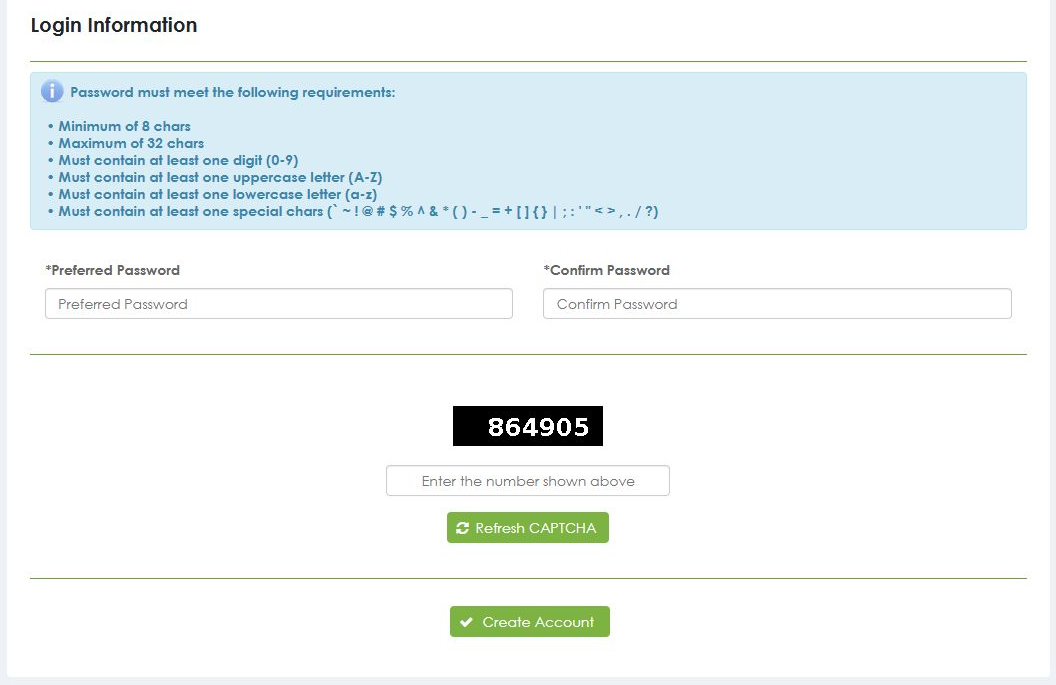
Enter your password twice. Complete the CAPTCHA using the code on your own screen, then select Create Account.
Password requirements: 8–32 characters, including a capital letter, a small letter, a number and a special character.
Activate and sign in
Check your email after submitting. Complete any activation step PhilHealth requests, then sign in with your PIN and password.
View and print your PhilHealth MDR
Your Member Data Record (MDR) contains your PhilHealth membership information. Review it to check that your personal details and registered dependents are correct.
Details to review on your record
| Record detail | Check for |
|---|---|
| Personal details | Correct name, birth date and contact information. |
| Membership details | Your PIN and the membership information recorded by PhilHealth. |
| Dependents | The names of dependents registered under your membership. |
-
Sign in to your account
Use your existing Member Portal account. Members without online access can create an account with their PIN.
-
Open and review your MDR
Find the Member Data Record viewing or printing option in your account. Check the information before keeping a copy.
-
Print or save a copy
Use the available print option. Choose your printer, or select Save as PDF if your browser offers it.
Keep your record accurate. If a detail is incorrect, request a correction through PhilHealth. An LHIO can also assist with MDR requests.
Find a PhilHealth office ↗Check your PhilHealth contribution history
See which contribution periods appear in your Member Portal. Compare your record with your payment receipts or payslips to spot missing or incorrect entries.
-
Open your contribution history
Sign in to the official Member Portal and find the contribution history section. Follow our login guide if you need help accessing your account.
-
Review the periods and amounts
A posted contribution is a payment recorded in your account. Check the month and year covered, then compare the recorded amounts with your own documents.
-
List anything that needs checking
Write down each missing period or amount that looks incorrect. Keep the related receipts or payslips ready when asking for verification.
For employed members
Ask your HR or payroll team to verify the remittance for the affected periods. You can also request validation from your nearest PhilHealth office.
For payments you made yourself
Keep copies of your receipts and ask a PhilHealth office to validate a missing or incorrect entry.
Get your SPA ready before paying
A Statement of Premium Account (SPA) is your PhilHealth billing statement. It shows the reference number, covered period and premium due for your payment.
The official starting screen
Actual screenshot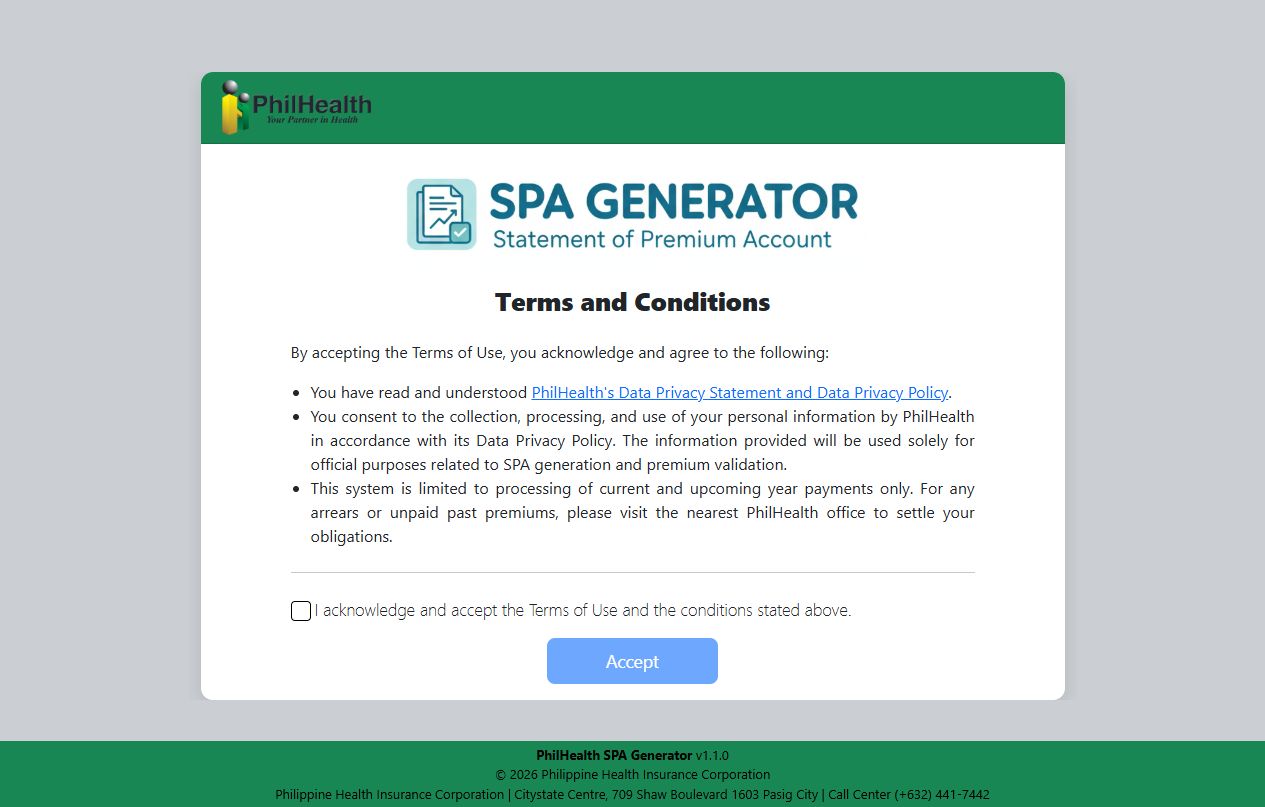
-
Open the official generator
Read the terms. If you agree, tick the acknowledgement box and select Accept to continue.
-
Validate your membership details
Enter your PIN, last name and first name exactly as registered. Enter the CAPTCHA shown on your screen, then select Validate.
-
Generate and save your SPA
Complete the coverage period and monthly income if required. Review the information, enter the CAPTCHA, then select Generate SPA and Save.
-
Pay and keep your receipt
Review the amount and due date. Follow your SPA’s instructions using the Member Portal, a PhilHealth office or an accredited collecting agent. Keep your receipt, then check your recorded contributions.
Older unpaid periods or record issues
The generator supports current and upcoming year payments. For older arrears or unresolved billing details, request help from a PhilHealth office.
SPA rules: 2026 to 2027
During 2026, limited documented flexibility applies to specified system or record issues. From 1 January 2027, a valid SPA becomes mandatory for self-paying transactions, subject to stated exceptions, including Geographically Isolated and Disadvantaged Areas (GIDAs).
Reviewed 29 October 2026 · Official generator steps ↗ · Payment policy ↗
Keep your PhilHealth record up to date
Changed your address, spotted an incorrect detail or need to declare a dependent? Use the PMRF to request an update to your existing membership.
Find the right part of the form
PMRF means PhilHealth Member Registration Form. Read the instructions on its second page before filling it out.
- Parts I & II
- Personal information, address and contact details.
- Part III
- Declaration of dependents and their relationship to you.
- Part V
- The correction or change you are requesting.
-
Complete and sign the PMRF
Select Updating/Amendment under Purpose. Write your existing PIN and complete the relevant fields in capital letters. Sign and date the form.
-
Prepare supporting documents
Include documents supporting the correction or proving your relationship to a dependent. The documents needed depend on your request.
-
Submit and review the update
Submit your form and documents to a PhilHealth office for assessment. After processing, review your updated MDR to check the changes.
Document examples
Adding a child A birth certificate can help establish the parent-child relationship.
Adding a spouse A marriage certificate can help establish the relationship.
These are examples, not a complete checklist. PhilHealth verifies dependent eligibility and may request other applicable documents. Use your existing PIN for updates.
Start your care with a YAKAP clinic
YAKAP means Yaman ng Kalusugan Program. It expands PhilHealth’s Konsulta primary-care benefit, helping members and dependents access ongoing care through accredited clinics.
Care available through YAKAP
- Consultations
- Health checkups and follow-up care at your chosen clinic.
- Tests and screening
- Covered services recommended for your needs, with referrals when required.
- Prescribed medicines
- Covered medicines through the applicable GAMOT process and accredited providers.
From choosing a clinic to your first visit
-
Choose a nearby clinic
Check the official clinic list for your city or province. Contact the clinic to confirm its location and schedule.
-
Record your clinic choice
Use the Member Portal or eGovPH app. You can also ask a YAKAP clinic or PhilHealth office for assisted selection.
-
Attend your first assessment
Complete the First Patient Encounter (FPE). Bring your PIN, existing medical records and a valid ID if needed for verification.
-
Confirm your care agreement
After the FPE, read and sign the YAKAP Empanelment Slip (YES), also called the Mutual Care Agreement, with your clinic.
Tests, medicines and referrals depend on clinical assessment and program rules. Ask the clinic about any applicable charges before your visit. Dependents also need their own clinic selection.
Get covered medicines through PhilHealth GAMOT
Start with your YAKAP doctor. If medicines are needed, an authorized physician can issue a GAMOT prescription for collection through an accredited provider.
-
Get your GAMOT prescription
Consult your selected YAKAP doctor. Your GAMOT prescription must include a Unique Prescription Security Code (UPSC), which the provider uses to verify it.
-
Visit an accredited provider
Bring the prescription with its UPSC and a valid government-issued ID. Use the official provider list and contact the pharmacy to check stock and collection requirements.
-
Review your availment slip
After collection, check your GAMOT Availment Slip (GAS). It lists the medicines provided and your remaining annual benefit balance. Keep your copy.
Collection by a family member or representative
The representative needs an authorization letter, the patient’s GAMOT prescription with UPSC, and valid IDs for both the patient and representative.
Find the right PhilHealth benefit for your care
PhilHealth has different benefit packages for different services. Use this overview to understand the main types, then confirm the applicable package with your healthcare facility.
-
Hospital care
Benefits for covered admissions and procedures at accredited facilities. Many inpatient benefits use a case-rate amount applied to the hospital bill.
-
Outpatient treatment
Selected services such as day surgery, dialysis and radiotherapy have their own coverage rules and participating providers.
-
Maternity and newborn care
Packages support selected pregnancy, childbirth and newborn services. Confirm the mother’s and baby’s applicable benefits separately with the facility.
-
Z Benefits
Specialized packages for selected complex conditions. Ask a contracted facility about assessment, requirements and any pre-authorization needed.
Review your bill deduction
For approved hospital case-rate claims, the facility applies the benefit to your bill. Confirm the deduction and any remaining charges with its PhilHealth or billing desk.
Find official help, forms and offices
Use these PhilHealth channels for membership requests, benefit concerns and official forms. Choose the option that matches the help you need.
Locate a PhilHealth office
Find your regional office or Local Health Insurance Office (LHIO). Check the address and contact the office to confirm requirements before visiting.
Open the office directory ↗Download official forms
Get the PMRF, claim forms and related guidelines from PhilHealth’s downloads page. Ask the receiving office or facility which forms apply to your request.
Browse forms and downloads ↗Get help during a hospital visit
Ask the hospital about its PhilHealth CARES representative for benefit questions or coverage concerns. You can also request an itemized bill to review the PhilHealth deduction.
About this guide: PhilHealth Portal is an independent information website. Membership, payment and claim transactions are handled through official PhilHealth channels.
Back to top ↑Official resources and contact details reviewed 29 October 2026.
How to register for PhilHealth
First-time members can apply online for a PhilHealth Identification Number (PIN). Learn what to prepare, how to begin the official application and what happens after submission.
Keep the two steps clear. A PIN identifies your membership. Creating a Member Portal account gives you online access using an existing PIN.